If you’ve spent any time exploring 3D content online, chances are you’ve come across Sketchfab. It’s one of the most popular platforms for viewing, sharing, and embedding 3D models across the web. But alongside its popularity, a controversial term has been gaining attention: “Sketchfab ripper.”
So what exactly does that mean? Is it lega? Should you use one? And are there better alternatives?
Let’s break it all down in a clear, honest, and practical way—so you can make informed decisions without risking your work, reputation, or legal safety.
What Is a Sketchfab Ripper?
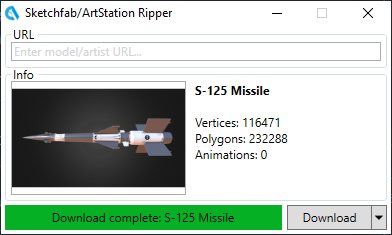
A “Sketchfab ripper” typically refers to software, scripts, or tools designed to extract or download 3D models from Sketchfab—especially when those models are not meant to be downloaded.
In simple terms, it’s a workaround method people use to:
- Save 3D models directly from the viewer
- Access textures, meshes, and animations
- Bypass creator restrictions
At first glance, it might sound like a convenient shortcut. But the reality is far more complicated—and often problematic.
Why Do People Look for Sketchfab Rippers?
There are a few common reasons why people search for these tools:
- Access to high-quality models: Some users want assets for personal or commercial projects without paying.
- Learning purposes: Beginners may want to study professional 3D work in detail.
- Offline use: Users might want models for environments without internet access.
- Game development or design: Quick asset sourcing for prototyping.
While some of these intentions seem harmless, the method used—unauthorized extraction—raises serious concerns.
The Legal Side: Is It Allowed?
Let’s be clear: using a Sketchfab ripper to download protected models without permission is generally not legal.
Sketchfab operates under strict licensing rules. Creators upload their work and decide:
- Whether downloads are allowed
- What license applies (e.g., Creative Commons, Standard License)
- How their work can be used
When you bypass those settings, you may be:
- Violating copyright laws
- Breaking platform terms of service
- Misusing intellectual property
Even if your intent is educational, unauthorized downloading can still cross legal boundaries.
Ethical Considerations You Shouldn’t Ignore
Beyond legality, there’s an ethical side that matters just as much.
3D artists spend hours—or even weeks—creating detailed models. When their work is taken without permission:
- They lose control over their creations
- Their potential income is affected
- Their motivation to share work publicly may decline
Supporting creators is essential if you want the 3D community to continue thriving.
Think of it this way: if you were the creator, how would you feel?
How Sketchfab Protects Its Content
Sketchfab uses several methods to protect uploaded models:
- Viewer-based rendering: Models are displayed via WebGL, not directly downloadable files
- Download restrictions: Creators can disable downloads
- Licensing systems: Clear terms for reuse and attribution
- API limitations: Controlled access to content
Despite these protections, no system is completely foolproof—which is why ripper tools exist in the first place.
Risks of Using a Sketchfab Ripper
Even if you ignore the legal and ethical concerns, there are practical risks involved.
1. Malware and Security Threats
Many “free” ripper tools are distributed through unofficial sources. These can contain:
- Viruses
- Spyware
- Data-stealing scripts
2. Low-Quality or Broken Models
Extracted models often:
- Lose textures or materials
- Have broken geometry
- Miss animations or rigging
3. Legal Consequences
If used commercially or publicly, you could face:
- Copyright claims
- Takedown notices
- Legal action
4. Reputation Damage
In creative industries, credibility matters. Using stolen assets can harm your professional image.
Better Alternatives to Using a Sketchfab Ripper
Here’s the good news: you don’t need to take risks to get great 3D assets.
1. Use Downloadable Models on Sketchfab
Many creators offer free downloads under licenses like:
- Creative Commons Attribution (CC BY)
- CC0 (public domain)
Just filter by “Downloadable” and always check the license.
2. Explore Free 3D Asset Websites
There are plenty of legitimate platforms offering free or affordable models:
- Poly Haven
- CGTrader (free section)
- TurboSquid (free assets)
- Sketchfab’s own store
These sources ensure you’re using content legally.
3. Learn to Create Your Own Models
If you’re serious about 3D work, investing time in learning tools like:
- Blender
- Maya
- ZBrush
…can be far more rewarding than relying on ripped content.
4. Purchase Licensed Models
Buying models gives you:
- High-quality assets
- Legal protection
- Support for creators
Think of it as an investment in your project.
5. Contact the Creator Directly
Sometimes, the best approach is simply asking.
Many artists are open to:
- Sharing files for educational use
- Offering custom licenses
- Collaborating on projects
A polite message can go a long way.
When Is Downloading From Sketchfab Okay?
There are legitimate situations where downloading is completely fine:
- The model has a download button enabled
- It’s labeled with a permissive license (e.g., CC0)
- You follow attribution requirements
- You respect usage limitations
Always read the license details carefully before using any model.
Tips for Using 3D Models Responsibly
If you want to stay on the safe side, keep these tips in mind:
- Always check the license before downloading
- Credit the creator when required
- Avoid modifying or reselling restricted assets
- Keep records of where you got your models
- When in doubt, ask for permission
These habits will protect you in the long run.
The Future of 3D Content Sharing
As 3D content becomes more mainstream—especially in gaming, AR/VR, and the metaverse—the importance of ethical usage will only grow.
Platforms like Sketchfab are evolving to:
- Improve creator protection
- Offer better monetization tools
- Encourage fair usage
At the same time, users are becoming more aware of digital rights and ownership.
This shift means one thing: cutting corners is becoming less acceptable—and less necessary.